
 1
1Join the race
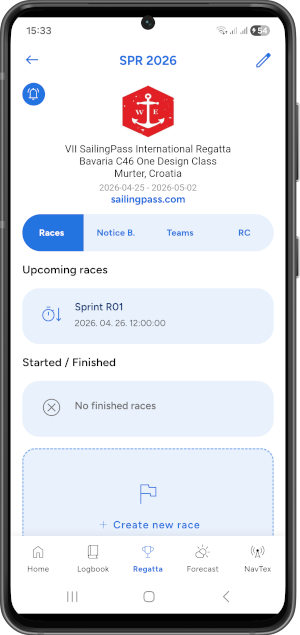
Open the selected race with the account linked to your team. Grant the required location permissions and allow background recording.
Live sailing race tracking from smartphones. No dedicated tracking hardware required. Connect race setup, synchronized starts, official signals and timing review in one sailing app.


Each tracked team uses a smartphone running SailAlign. Organizers and spectators follow the participating fleet in the app or public SailAlign Watch.
1Open the selected race with the account linked to your team. Grant the required location permissions and allow background recording.
2Start manually when permitted, or follow the RC Auto-start mode after opening the race. Keep the phone powered and location services enabled.
3View participating boats and the course in Watch without signing in. Live position sharing needs a data connection; saved points can upload after a temporary connection loss.
GPS recording and live broadcasting are different: recording can continue offline with the required permissions, while remote viewers need uploaded positions. Automatic crossing records remain subject to Race Committee review.
Set up the sailing event with its name, dates, details, contact information, and logo. Competitors, RC members, and followers can find the published regatta before race day.
Create races or legs, add teams, and assign boat classes. Choose several classes for each race or use All classes. This selection determines participating teams for tracking, timing and new result entries. Record sail, bow and race numbers, skipper and boat name, then use fast search to identify boats quickly at checkpoints and the finish.
Use the visual course editor to place marks, gates, turning points, start lines, and finish lines. Check distances and true bearings with the draggable divider and adaptive map scale. The selected course can be shared with competitors and displayed with live fleet tracking and replay.
Capture or edit the port and starboard ends of the start line, or confirm a line prepared in the Course Editor. SailAlign broadcasts only the confirmed official line to the fleet, including distance-to-line information where available.
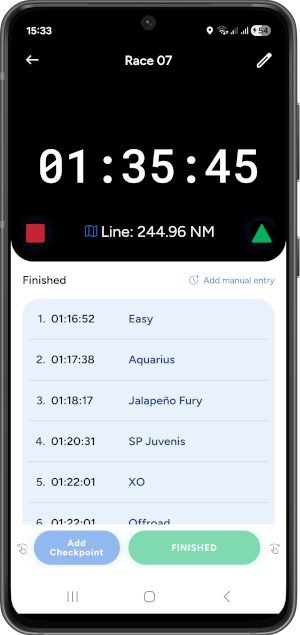
Broadcast the official start clock to connected devices. The countdown switches to elapsed race time after the start, helping competitors and RC members follow the same timing reference.
Boats can run live tracking from a standard phone with no dedicated tracker required. When automatic timing is enabled, SailAlign creates possible OCS, gate and finish records with GPS evidence for RC review. Officers can still record or correct results manually.
Review proposed timing records, then generate a PDF with approved finish times grouped by class when applicable. Publish documents or free-text messages on the Notice Board and notify subscribers about new updates.
SailAlign is more than a sailing race timer. It is a mobile regatta management system designed to support the full race-day workflow of a Race Committee. Instead of using separate tools for countdown timing, team lists, start line coordinates, course diagrams, finish notes, communication, and result documents, SailAlign connects these tasks in one app.
Race officers can prepare an event, coordinate the RC team, communicate with competitors, broadcast official race information, record activity on the water, and publish race documents after the finish. The workflow can support local club races, multi-day regattas, sailing schools, training events, one-design fleets, coastal races, offshore races, and charter regattas.
The tools are built around practical sailing situations: setting a start line from the committee boat, keeping the fleet synchronized before the start, identifying boats quickly at checkpoints and the finish, sharing Notice Board updates, and reviewing fleet movement through live tracking and replay.
SailAlign extends the mobile regatta workflow to a larger desktop workspace. Race Committees can prepare and administer events in the RC Dashboard, while the race-viewing experience available in the mobile app is also available to sailors, families, clubs and spectators in a desktop browser through the public Watch viewer.
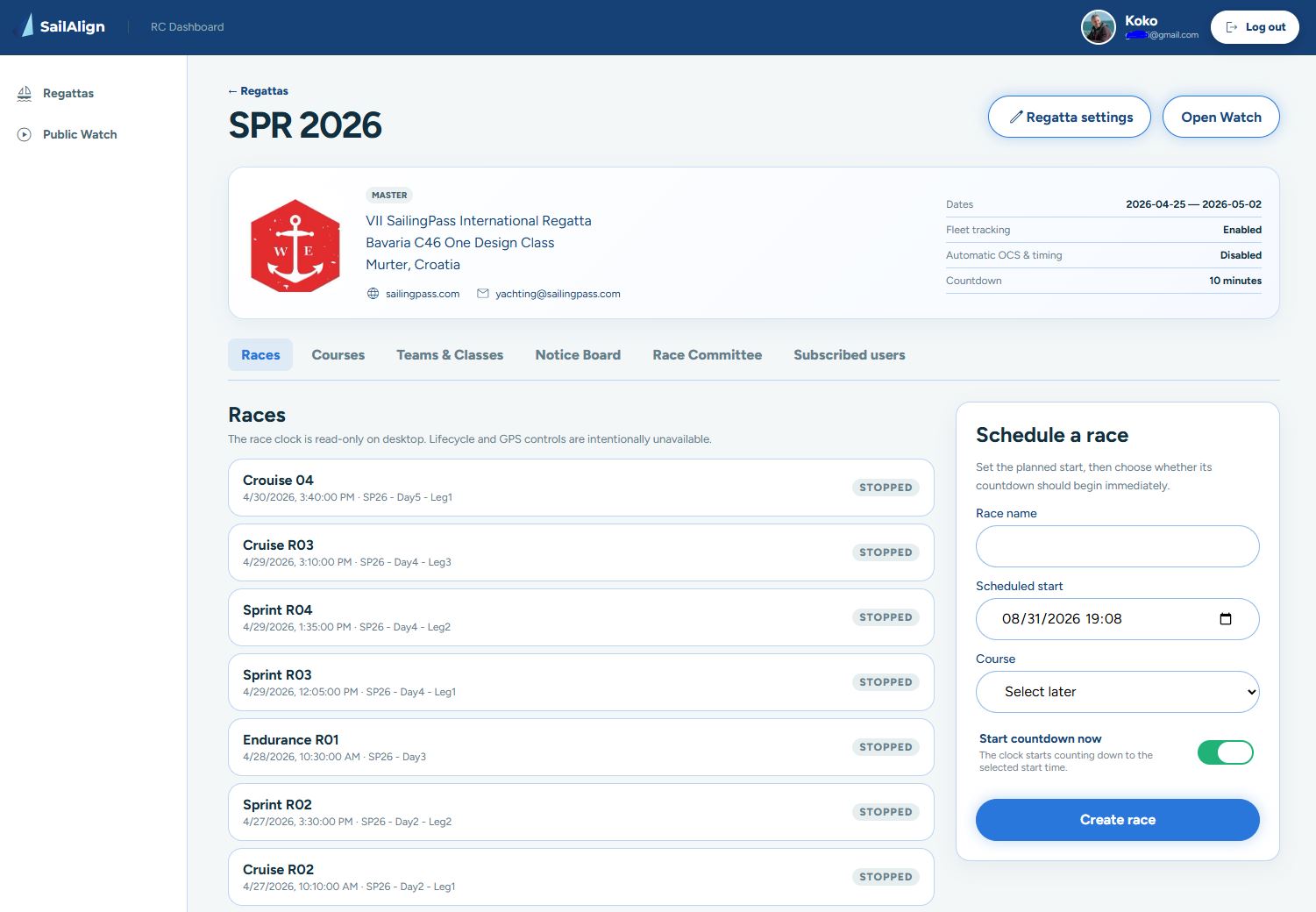
Open the SailAlign RC Dashboard on a laptop or desktop to work with more space when preparing a sailing event. Authorized RC members can manage regatta information, teams, race classes, courses, manual start lines, Notice Board updates, race signals, timing records and reports. Fleet tracking control lets members with the required permission apply tracking modes and check team activity from the browser too.
Measure distance and bearing on the course editor and RC maps. The dashboard complements the mobile app: position recording and race-clock Start, Stop, Reset and Synchronize controls remain on mobile.
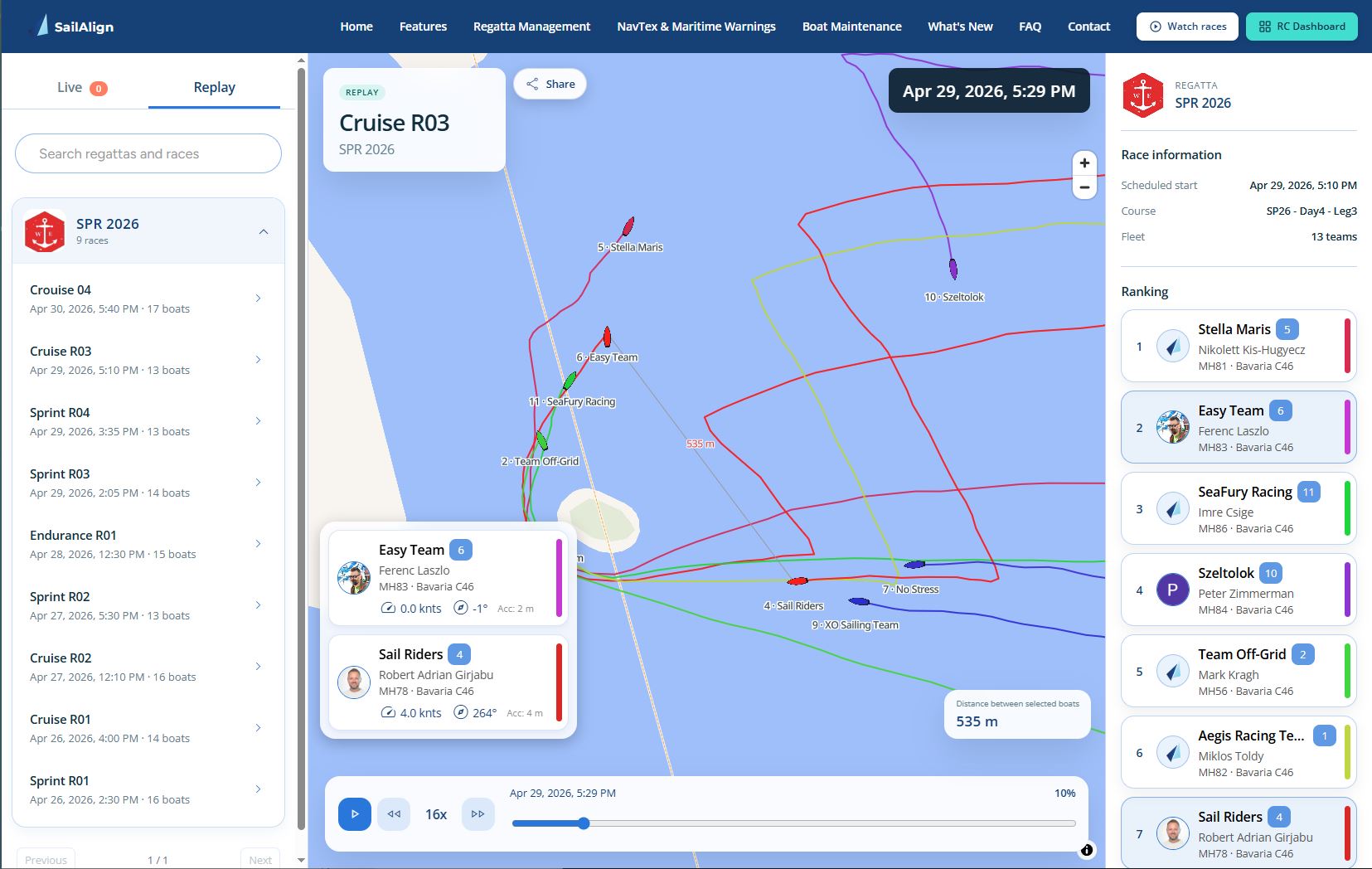
Open RC DashboardSailAlign Watch brings live fleet tracking and race replay from the mobile app to a larger desktop browser view. Follow eligible live races on an interactive map or replay completed races with the official course, tracked boats, sailing trails, team cards, rankings, selected-boat distance and timeline speed controls.
Watch is completely public: no SailAlign account or sign-in is required, making it easy to share a race link with club members, supporters and spectators.
Watch racesKeep the fleet informed during changing race conditions and reduce manual finish-boat workload. SailAlign combines real-time race signals with reviewable OCS, gate and finish timing evidence in the same Race Committee workflow.
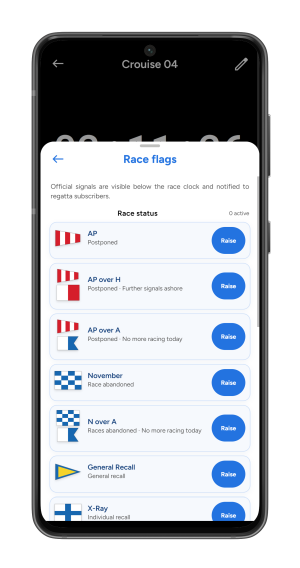
Authorized RC members can raise, replace and lower race status, preparatory and course signals. Active flags appear for connected users immediately, while subscribers can receive a push notification about the change.
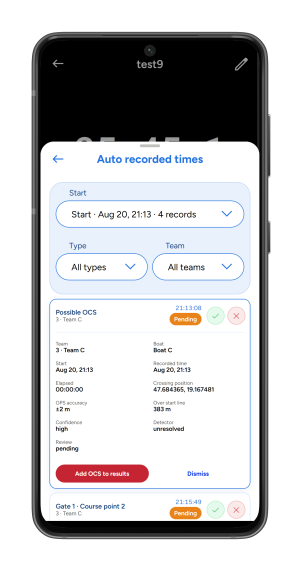
With Live Fleet Tracking and automatic timing enabled, the detector evaluates the confirmed start line and ordered course boundaries. It keeps proposed records together with the evidence the RC needs to make a decision.
SailAlign’s Regatta Management module supports the complete Race Committee workflow - from regatta setup, team and boat class management, and course planning to synchronized race starts, official race signals, live start line broadcasting, fleet tracking, automatic OCS detection, gate and finish timing, Notice Board communication, and PDF result publishing.
Race officers can create sailing events, add races, assign teams, manage sail numbers, bow numbers and race numbers, draw the planned race course on the map, confirm the official start line, and broadcast the synchronized countdown to the fleet in real time. Competitors can follow the official race clock, active race flags, start line information, distance to the line, live fleet movement, checkpoint updates, and approved finish data directly in the app.
Designed for sailing clubs, race committees, regatta organizers, coaches, and competitive fleets, SailAlign reduces manual work and keeps race-day information connected in one mobile system. During the race, RC members can apply official race codes such as OCS, DNS, DNF, DSQ, and RET. The PDF export contains recorded finish times grouped by class when applicable; it does not calculate corrected-time rankings. Explore all SailAlign features or visit the SailAlign FAQ.
SailAlign supports event preparation, communication, synchronized timing, fleet visibility, result recording, and post-race documentation for race officers, sailing clubs, and competitive fleets. Learn more about SailAlign’s sailing tools.
Every boat sees the same live countdown and race timer - eliminating start confusion and timing errors.
Build your race course directly on the map using an intuitive editor. Add marks, gates, turning points, start and finish lines, and share the course layout with the entire fleet. A Course Editor start line remains a preview until an authorized RC member confirms it as the official line.
Track the entire fleet live during the race. Teams can start a tracker directly from their phone - no expensive hardware required. The live broadcast can be viewed by anyone following the regatta.
Broadcast precise start line coordinates to all participants for transparent and fair starts.
Raise race status, start and course flags, share active signals in real time, and retain an event history for the RC.
Use the confirmed start line and fleet tracker evidence to identify possible OCS boats for Race Committee review.
Assign boat names and team identifiers for clear result lists and professional race documentation.
Use as your main timing system or as a synchronized backup to traditional race committee tools.
Record times manually or review detector-assisted OCS, gate and finish events created from fleet tracking. Assign teams, add notes, and apply official race codes (OCS, DNS, DNF, DSQ, RET, etc.).
Publish sailing instructions, documents, free-text announcements, and PDF results in one place. Subscribers receive push notifications when new races or new Notice Board content is published.
Invite RC members and delegate tasks like start line, checkpoints, finish recording, or Notice Board publishing. Share workload for faster operations and fewer missed finishes.
Export a PDF with recorded finish times, race codes, and race information, grouped by class when applicable. Regenerate the document after corrections so it reflects the latest RC records.
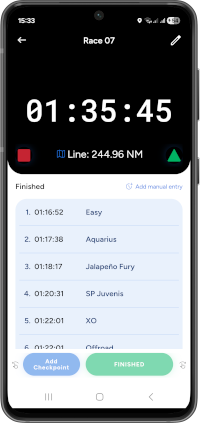
SailAlign makes live fleet tracking accessible to sailing clubs and regatta organizers without requiring dedicated tracking hardware. Each participating boat can use a standard mobile phone running SailAlign as its tracker, which simplifies deployment for club races, training events, charter regattas, and multi-day sailing competitions.
Eligible linked teams can start tracking from the race screen, or the RC can apply Auto-start for the race’s selected classes. Competitors open the intended race in the app and allow location access. Race organizers, competitors and spectators can follow the fleet live, including before the countdown when the RC starts tracking early. After the finish, recorded movement can be reviewed in Replay.
The recorded track also connects with the sailor’s personal logbook workflow. The sailor who ran the tracker can use the race track for a logbook entry and review route replay, telemetry, statistics, and performance data.
Pending positions are queued on the device and uploads are retried through temporary connection loss. Accepted positions are stored on the backend for later retrieval. Local recording and server storage help preserve captured tracks when the signal drops, while location permission and a running, charged device remain necessary to capture positions.
Give race officers one place to coordinate team tracking in the app or desktop RC Dashboard. The MASTER has access automatically; other officials need the Control fleet tracking permission. Enable fleet tracking, add teams in the race’s selected classes, and assign a course before opening the control.
Competitors start and stop their own tracker under the normal course and race-clock requirements. Returning to Manual releases an RC stop restriction and leaves existing recordings running.
Start tracking for eligible linked teams once they open the race in the app. A course is required; a running race clock is not. Competitors can confirm Stop to prevent further RC auto-starts for this race on their device, even after a new Start instruction. They can still start manually.
Stop team trackers assigned to this race and disable manual starts. Competitors tapping the inactive control see that tracking has been disabled by the Race Committee.
Opening Fleet tracking control only opens the modal. Review the affected classes and teams, choose a mode, then confirm with Apply tracking mode. The team list puts inactive boats first, explains their status, and summarizes activity with counts such as “10 active · 2 inactive”. Unavailable activity information is shown as unknown.
Each competitor must open the target race and grant the required location permissions. Offline or suspended phones apply instructions when they reconnect or resume; sending an instruction does not mean every phone is already recording. Stopping the race clock is separate from stopping fleet tracking.
Select one or several classes, or use All classes to include every class, including ones added later. The selection applies to manual and automatic team tracking, the current Live fleet, timing and new result entries. Previously recorded tracks and results remain available after a class change, and a spectator’s own class does not limit viewing Live or Replay.
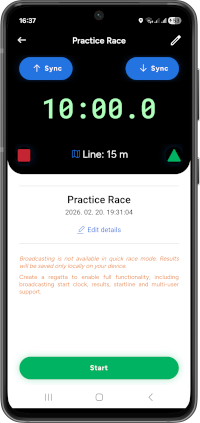
Start a solo session instantly - no setup, no broadcast, just sail. Ideal for standalone quick races, warm-ups, and practice.
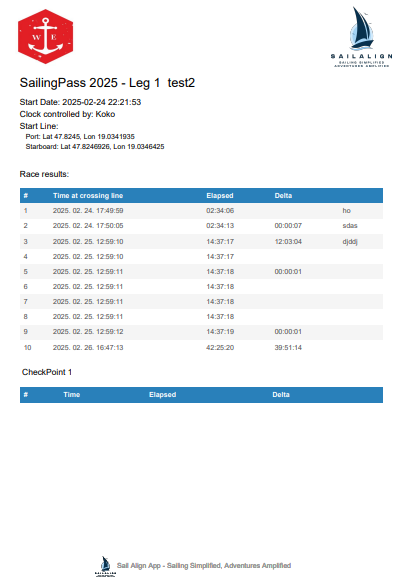
Generate clear, printable results right after the race - fast, effortless, and customizable with boat numbers or team names.
The PDF contains recorded finish times and race information, grouped by class when applicable. It does not calculate handicap-corrected standings. The Race Committee remains responsible for reviewing official results.
Updated step-by-step guide to race classes, RC fleet tracking modes, team activity, map measurement, recording through connection loss, start lines, timing and race-day communication.
Regatta management is rarely a one-person job. SailAlign lets organizers invite RC members and assign role-based permissions so different officers can manage teams, record the start line, handle checkpoints and finish timing, or publish Notice Board updates.
RC members can share live positions while working inside the regatta. Distance and bearing awareness supports mark placement, committee boat movement, course setup, and coordination between several boats operating across the race area.
This distributed workflow helps sailing clubs and larger events reduce missed records, improve communication, and keep the Race Committee organized from event setup to the final result document.
RC members can share their real-time locations with each other for better coordination on the course.
See where teammates are relative to you, helping you position marks and coordinate actions faster.
Upload documents and publish free-text messages in one chronological Notice Board - participants can read or download updates anytime.
Subscribers get notified about new Notice Board uploads and key regatta updates.
The same connected workflow can be adapted to short training races, regular club programs, and longer competitive events.
Run weekly or weekend club races with synchronized starts, team lists, start line broadcasting, finish recording, and PDF result sharing.
Manage boat classes, bow numbers, race numbers, and class-grouped timing documents for one-design sailing events.
Use live fleet tracking, checkpoints, course overlays, and replay to follow longer races and review fleet movement after the finish.
Organize practice starts, training races, and course exercises with a shared countdown, start line awareness, and replay tools.
Support charter fleets with phone-based tracking, simple team setup, Notice Board communication, and downloadable race documents.
Keep races, teams, announcements, documents, tracking, and recorded finish times organized across several racing days.
Join clubs and sailors using SailAlign's synchronized regatta start system
Participants simply open SailAlign, navigate to the race section, and select your event from the list of active broadcasts. They'll instantly see the synchronized countdown and all race information.
The initial synchronization requires internet connectivity to receive the official start time. Once synchronized, the countdown continues accurately even if connection is lost during the race.
Absolutely. Many race committees use SailAlign as a reliable backup system alongside traditional equipment, or as their primary timing system for smaller club races and training sessions.
Connected devices continuously align to the master race clock. A compact status badge shows whether a device is syncing, synchronized, degraded or disconnected, with drift and connection details available in the sync popup.
Yes. Eligible linked teams can start tracking from their phone, or an authorized RC member can apply Auto-start. Competitors open the target race and grant location access. Organizers, competitors and spectators can then follow the participating fleet live, including before the race clock starts when Auto-start is enabled.
No dedicated tracking hardware is required. Each tracked team uses a smartphone running SailAlign with its linked account and location permission. The user can start manually when allowed, or follow the RC Auto-start mode after opening the race.
Yes. SailAlign includes a visual course editor where race organizers can place marks, gates, turning points, start and finish lines directly on the map. The course layout can be shared with the entire fleet so every competitor can see the planned race course.
Yes, you can add or edit boat numbers, team names, and adjust times before generating the final PDF results document.
No. The PDF contains the recorded finish times (grouped by class when applicable) and reflects the results exactly as recorded. You can regenerate the PDF anytime after corrections.
Competitors can follow the live countdown, see the start line broadcast, and view checkpoint/finish timestamps as the RC records them. If they subscribe, they also receive push notifications about new races and Notice Board updates.
Yes. The RC can delegate tasks such as checkpoint recording, finish recording, and publishing to the Notice Board, using role-based permissions for a smooth and coordinated workflow.
SailAlign is more than a sailing race timer. It includes regatta setup, race creation, team and boat class management, start line broadcasting, synchronized countdowns, live fleet tracking, checkpoint and finish recording, Notice Board communication, RC collaboration, and PDF result export.
The Race Committee can record the port and starboard ends of the start line using GPS coordinates. SailAlign then broadcasts the line to competitors following the race, including distance-to-line information where available.
Yes. RC members can record intermediate checkpoint passing times, assign them to teams, add notes, and continue recording official finish times later.
Yes. Competitors can subscribe to a regatta and receive push notifications when new races, announcements, documents, or Notice Board updates are published.
Yes. When Live Fleet Tracking and automatic timing are enabled, SailAlign analyzes the confirmed start line and tracker data to create possible OCS records for Race Committee review. The RC must approve a record before it becomes an official result.
Yes. SailAlign can detect course-aware crossings at configured gates and the finish line from live fleet tracking data. Each proposed time includes evidence for Race Committee review and only enters official results after approval.
Yes. The SailAlign RC Dashboard lets authorized Race Committee members manage regattas, race classes, courses, start lines, teams, Notice Board content, race signals, timing and reports from a desktop browser. Members with Control fleet tracking permission can also apply Manual, Auto-start or Stopped by RC and inspect team activity. Position recording and race-clock lifecycle controls remain in the mobile app.
Yes. SailAlign race tracking is available in the mobile app and through SailAlign Watch in a desktop browser. Watch displays eligible live races and replays with the course, tracked boats, sailing trails, team information, rankings, selected-boat distance and replay timeline controls. It is completely public, with no SailAlign account or sign-in required.
Bring the next part of your sailing workflow into the same app.
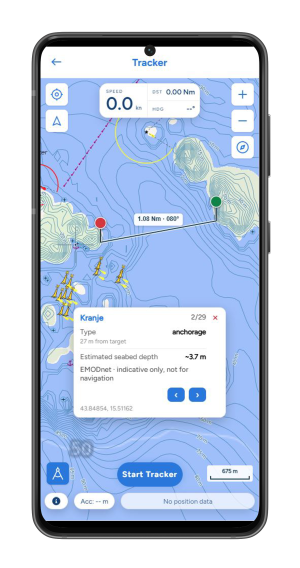
Record your sail, replay the route and understand your speed and maneuvers.
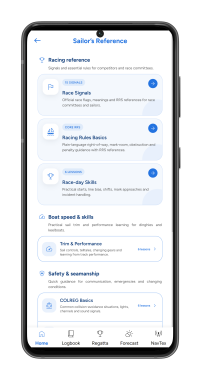
Review racing, safety and seamanship with clear illustrated lessons.